Microsoft excel Questions

This post is carefully prepared for you to make practice on Microsoft excel questions. But before proceeding to this exercise you have to read my seventh post. Additionally I recommend you to practice on the following list of posts.
- Basic Guide of Microsoft excel.
- Start with Microsoft excel.
- Font formatting in Microsoft excel document.
- Microsoft Excel sheet manipulation.
- Mathematical operations of Excel.
- Tables and visual descriptors in MS excel.
- Real time Application of MS excel.
You can get the Microsoft excel application from Get into PC.
Microsoft excel Questions (EKUB Selection)
- Prepare an excel sheet for list of EKUB members that has the following features.
- Add background image of excel sheet.
- The EKUB sheet should have member name, member ID, amount of birr each member saves per month.
- The excel will have a cell with filled color for a member who get his/her EKUB birr.
- Make the excel sheet, all border and the top row of the excel should have background color of orange.
- The excel sheet will have the amount of the money that is given to the member of the EKUB in each turn.
- You can use the following excel sheet as are reference.
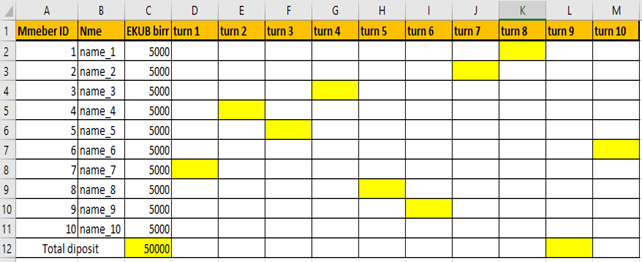
2. Use the following excel sheet example to answer the following function.

- Count the total student.
- Count the F and M students
- Count students who score average mark greater than 80
- Count female students who has average mark greater than 70
- Count Male students who has average mark greater than 70
Hint: use COUNT, COUNTIF and COUNTIFS function.
3. Prepare the excel sheet for grading system. The excel sheet will do the following task.
- The excel will have header title including, name of collage, name of department, course name, batch (year of study), semester and academic year.
- The excel sheet will have the column of student id, student full name, section assessment out of 20%,30% and 50%.
- You should calculate the total mark out of 100%. Take it as one column.
- Give the grade for each student based on the score out 100 %
- A+ if the total mark is >=90
- A for score >= 85
- A- for score >= 80
- B+ for score >= 75
- B for score >= 70
- B- for score >= 65
- C+ for score >= 60
- C for score >= 50
- F for score <50
Finally, the grading system will look like as follows.

Thank you for your doing this exercise.!! to know about our service visit this site.